# Upgrading peertube from 5.2.1 to 7.1.0
**URL:** https://eijil.com/t/upgrading-peertube-from-5-2-1-to-7-1-0/476
**Category:** Blog
**Created:** [December 1, 2023, 12:56pm UTC](https://eijil.com/t/upgrading-peertube-from-5-2-1-to-7-1-0/476 "2023-12-01T12:56:35Z")
**Posts on this page:** 5
**Page:** 1
### Author:  [@Tristan](https://eijil.com/u/Tristan)
#### Post date: [December 1, 2023, 12:56pm UTC](https://eijil.com/t/upgrading-peertube-from-5-2-1-to-7-1-0/476/1 "2023-12-01T12:56:35Z")
According to the [changelog](https://github.com/Chocobozzz/PeerTube/blob/develop/CHANGELOG.md), upgrading peertube requires manually modifying some configuration files, first and formost. ~~you need to [upgrade](https://github.com/nodesource/distributions/wiki/How-to-migrate-to-the-new-repository) nodejs to version 18.~~
NodeJS v18 support has been removed since peertube v7.1.0, we can update nodejs to v20 by running the following command:
```bash
curl -fsSL https://deb.nodesource.com/setup_20.x -o nodesource_setup.sh
bash nodesource_setup.sh
apt install nodejs -y
```
# Run the script
After you upgrade nodejs to version 18, run the upgrade script listed in the official [upgrade doc](https://github.com/Chocobozzz/PeerTube/blob/develop/support/doc/production.md#upgrade).
```bash
cd /var/www/peertube/peertube-latest/scripts && sudo -H -u peertube ./upgrade.sh
sudo systemctl restart peertube # Or use your OS command to restart PeerTube if you don't use systemd
```
One the above script finished running, you’ll need to manually modify some configuration files.
I’m using notepad++ with the plugin Compare to help me with the job.
**Make sure to back up files before starting this task!**
# Change the production.yaml
The first file you need to modify manually is the new **production.yaml.example** which is located in `/var/www/peertube/versions/peertube-v6.0.1/config`, you’ll use the new file to overwrite the old one which is located in `/var/www/peertube/config` named **production.yaml**.
Download the new config file from the VPS and rename the new file production.yaml.example to 6.0.1.yaml and the old production.yaml to 5.2.1.yaml, this is not mandatory but is recommended to avoid confusion when modifying files later on.
Open both files with notepad++. Then click Plugins-\>Compare-\>Compare:
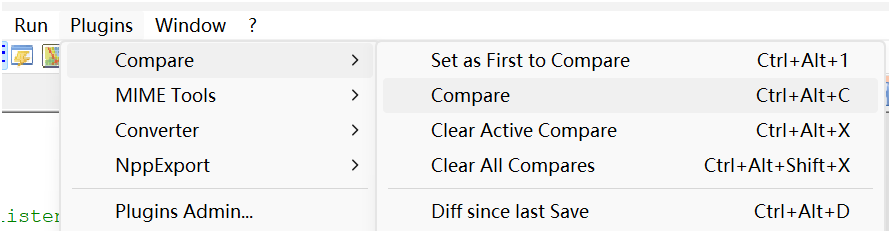
Notepad++ will display the two files side by side on the screen, and highlight the differences.

The new file is on the left side, which is the one you’ll be editing, and the old configuration file is on the right side. You’ll need to transfer some of the configuration information from the old file into the new one.
The things you need to change are related to your Peertube instance, such as domain name, keys, database details, redis, domain certificates etc. Be really careful during this process and double-check everything.
Once the old config infos were seccessfully migrated, rename the folder:
```shell
sudo -u peertube mv '/var/www/peertube/storage/videos/' '/var/www/peertube/storage/web-videos/'
```
Since the folder name has been changed in the new production.yaml(6.0.1.yaml), so we need to change it manually.
Save the new file 6.0.1.yaml as production.yaml, upload and overwrite the old one( **remember to make a back up!** ) located in `/var/www/peertube/config`
Pay attention to the file’s ownership. If it’s not already set to `peertube`, you can change it by running the command `chown peertube production.yaml`
# Change the nginx file
This step is similar to the previous one, so I won’t repeat it. Just fill in the old configuration details into the new Nginx config file, and make sure to check it several times for accuracy! **Make a back up before you overwrite the file.**
# Restart everything
That’s it! Now, all we need is to restart everything. You can simply reboot the server, or you can restart peertube and nginx manually:
```bash
sudo systemctl reload nginx
sudo systemctl restart peertube
```
If anything goes wrong, look into the log by running `sudo journalctl -fu peertube`
---
### Author:  [@Tristan](https://eijil.com/u/Tristan)
#### Post date: [December 8, 2023, 4:03pm UTC](https://eijil.com/t/upgrading-peertube-from-5-2-1-to-7-1-0/476/2 "2023-12-08T16:03:40Z")
@Chatbot summarize this post
---
### Author:  [@Chatbot](https://eijil.com/u/Chatbot)
#### Post date: [December 8, 2023, 4:04pm UTC](https://eijil.com/t/upgrading-peertube-from-5-2-1-to-7-1-0/476/3 "2023-12-08T16:04:07Z")
Certainly! The instructions provided are for upgrading PeerTube from version 5.2.1 to version 6.0.1. Here’s a summarized step-by-step guide:
1. **Upgrade Node.js** : Ensure Node.js is upgraded to version 18.
2. **Run Upgrade Script** : Execute the upgrade script as mentioned in the official documentation.
3. **Modify Configuration Files** :
- Compare the new `production.yaml.example` (located in `/var/www/peertube/versions/peertube-v6.0.1/config`) with the old `production.yaml` (in `/var/www/peertube/config`). Transfer necessary configuration changes related to Peertube instance details (e.g., domain name, keys, database details, Redis, domain certificates, etc.) from the old to the new file.
- Rename folders if needed (e.g., `storage/videos` to `storage/web-videos`).
- Save the modified `6.0.1.yaml` as `production.yaml` and replace the old one in `/var/www/peertube/config`.
- Ensure proper file ownership (`chown peertube production.yaml`).
4. **Change Nginx Configuration** : Similar to the above step, update the Nginx configuration file with the corresponding details.
5. **Restart Services** : Restart PeerTube and Nginx:
- `sudo systemctl reload nginx`
- `sudo systemctl restart peertube`
6. **Troubleshooting** : If any issues arise, check logs using `sudo journalctl -fu peertube`.
Remember, backup files before making changes and exercise caution while modifying configuration files.
---
### Author:  [@Tristan](https://eijil.com/u/Tristan)
#### Post date: [October 6, 2024, 2:18pm UTC](https://eijil.com/t/upgrading-peertube-from-5-2-1-to-7-1-0/476/4 "2024-10-06T14:18:05Z")
## Upgrade peertube to 6.3.1
Since my instance is way behind the newest version, I must read the changelogs carefully and make changes to the peertube nginx config file as needed. That’s to say we need to run some commands or modify some of the config files before issuing the update command.
### V6.0.3
> You must update your nginx configuration like in [this commit](https://github.com/Chocobozzz/PeerTube/commit/12ea8f0dd11e3fb5fbb8955f5b7d52f27332d619#diff-be9f96b9b1de67284047e610821493f9a5bec86bfcdf81a7d8d6e7904474c186) (line `202` replace `location ~ ^(/static/(webseed|web-videos|streaming-playlists)/private/)|^/download {` by `location ~ ^(/static/(webseed|web-videos|streaming-playlists/hls)/private/)|^/download {`)
### V6.1.0
add the following lines in your peertube nginx config file:
```nginx
location ~ ^/api/v1/users/[^/]+/imports/import-resumable$ {
client_max_body_size 0;
proxy_request_buffering off;
try_files /dev/null @api;
}
```
### V6.2.0
Install pip3 if you haven’t already done so.
```shell
apt install python3-pip
```
Make sure you have made above changes first. Then run the upgrade command:
```bash
cd /var/www/peertube/peertube-latest/scripts && sudo -H -u peertube ./upgrade.sh
sudo systemctl restart peertube
sudo -u peertube yarn cache clean
```
I ran into some errors when I run the following command according to the 6.3.0 changelog:
```bash
cd /var/www/peertube/peertube-latest && sudo -u peertube NODE_CONFIG_DIR=/var/www/peertube/config NODE_ENV=production node dist/scripts/migrations/peertube-6.3.js
```
It doesn’t seem to be causing any issues that I can see, so I’m just gonna leave it be for now.
---
### Author:  [@Tristan](https://eijil.com/u/Tristan)
#### Post date: [December 18, 2024, 10:36am UTC](https://eijil.com/t/upgrading-peertube-from-5-2-1-to-7-1-0/476/6 "2024-12-18T10:36:57Z")
Peertube v7.0.0 has been released.
The UI has changed a lot.
But the upgrade process is quite straightforward.
Take a look at the changelog and then run the upgrade command.